One Afternoon With Your Register.
This is the whole loop a welding shop lives through — a folder of WPS files becoming a register that stays current on its own — shown on the real screens, not mock-ups. Follow it top to bottom, or jump to the part that matters to you. This is Elenchon WPS Manager doing the actual work.
You Know Where You Stand Before Your Coffee's Cold
No hunting through a shared drive. The overview tells you what's confirmed, what needs a look, and exactly how many procedures you hold.
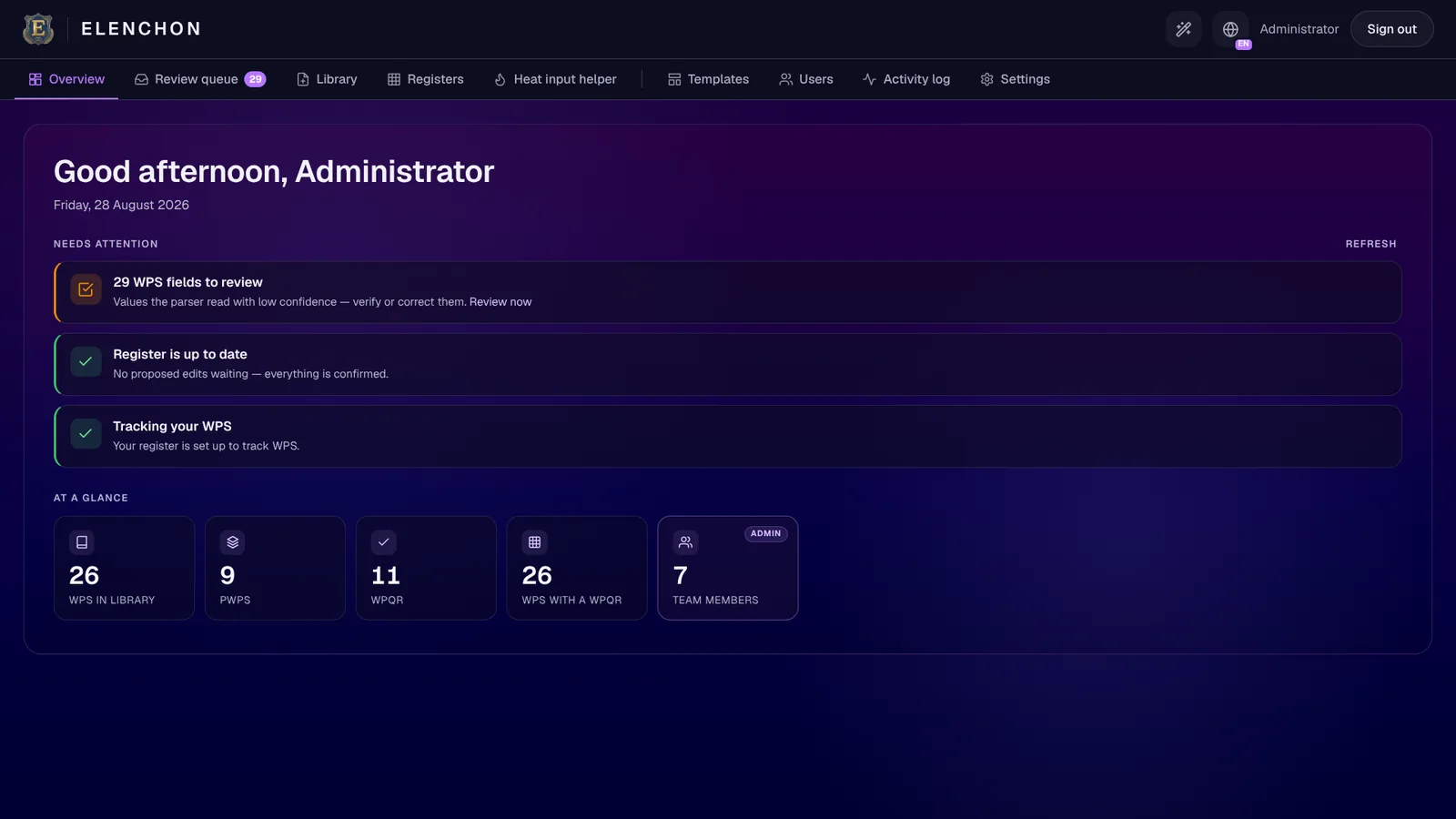
The Needs attention panel is the honest part: it doesn't say “all good” unless it is. Here it's telling you 29 parsed values were read with low confidence and want a human eye — one click takes you straight to them. Everything else is green.
Import From the Library — Excel & PDF, Read For You
Pull the WPSs you already hold straight into a register. Two purpose-built parsers do the data entry — you never re-type a procedure into someone else's template.
- Excel and PDF, both native: One parser reads Excel WPS workbooks; another reconstructs a PDF form's ruled grid and reads its cells. Process, materials, ranges and pass-by-pass parameters land as structured fields.
- Bilingual out of the box: The built-in profile reads English and Portuguese layouts as shipped, so a mixed EN/PT form imports without special setup.
- Batch, and classified as it lands: Bring in a whole stack at once — each file sorted into a new WPS, a new revision, or a correction, with revisions grouped from the start.
- Tuned to your template: Standard ISO 15609-style forms work immediately; during onboarding we tune the parser to your company's exact layout.
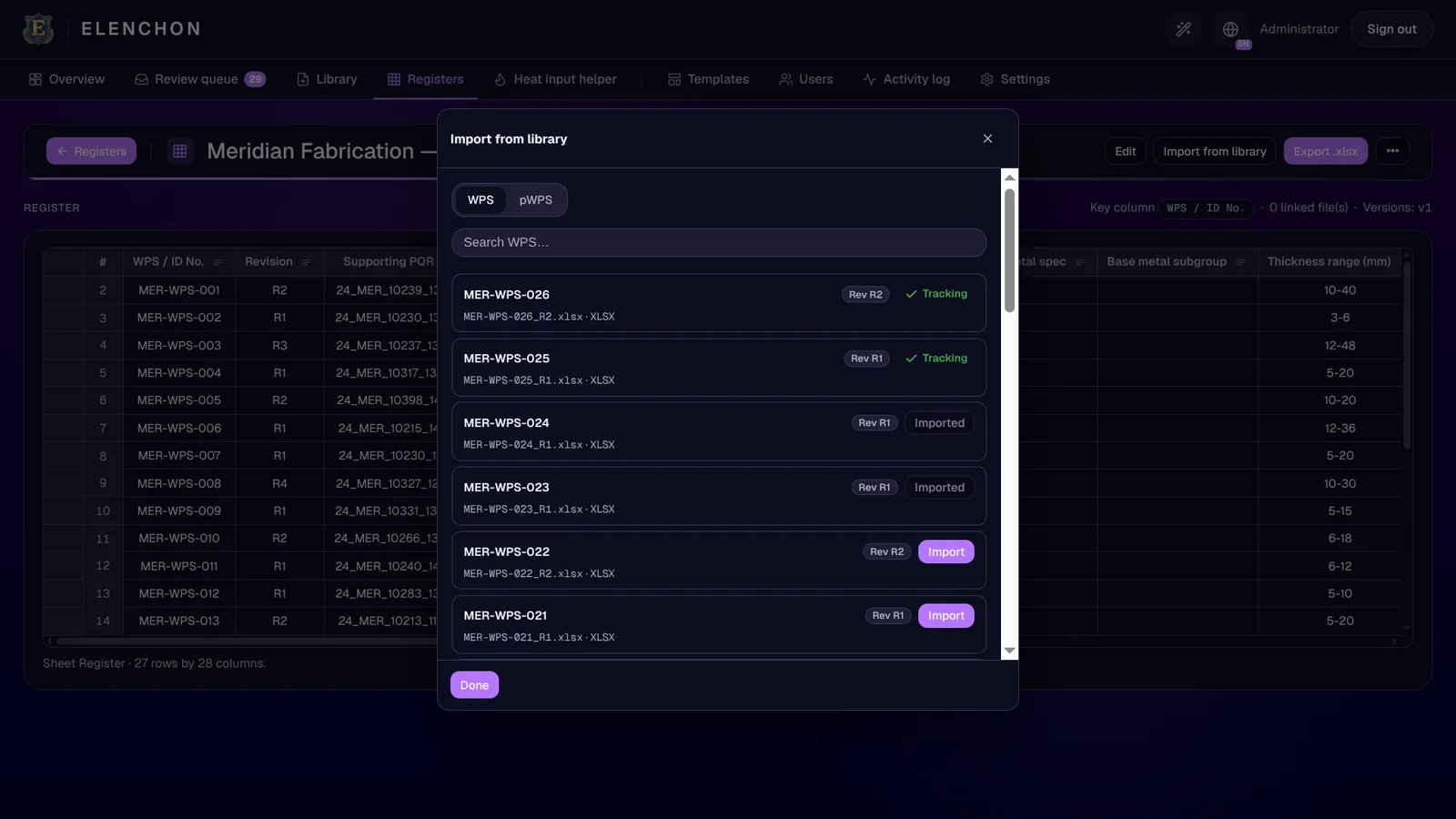
Every WPS in the library is one click from the register. The Tracking / Imported tags mean you never import the same revision twice or lose track of which procedures the sheet is actually watching.
Every Parsed Value, Waiting for Your Sign-Off
The review queue is the safety catch. A parser is only trustworthy if you can see what it read — and here you approve it, value by value.
- See exactly what would change: Each row is a document, a field, and the value read — nothing is written to your register until you confirm it.
- Low-confidence reads are flagged: Anything the parser wasn't sure of — or a heat input it computed — is shaded amber and surfaced, so your attention goes exactly where it's needed.
- Verify without leaving: Confirm a computed heat input right from the queue, or open the document in the library to check it against the source first.
- Set your own bar: Review every value, review only the uncertain ones (the default), or auto-apply and lean on versioning to undo.
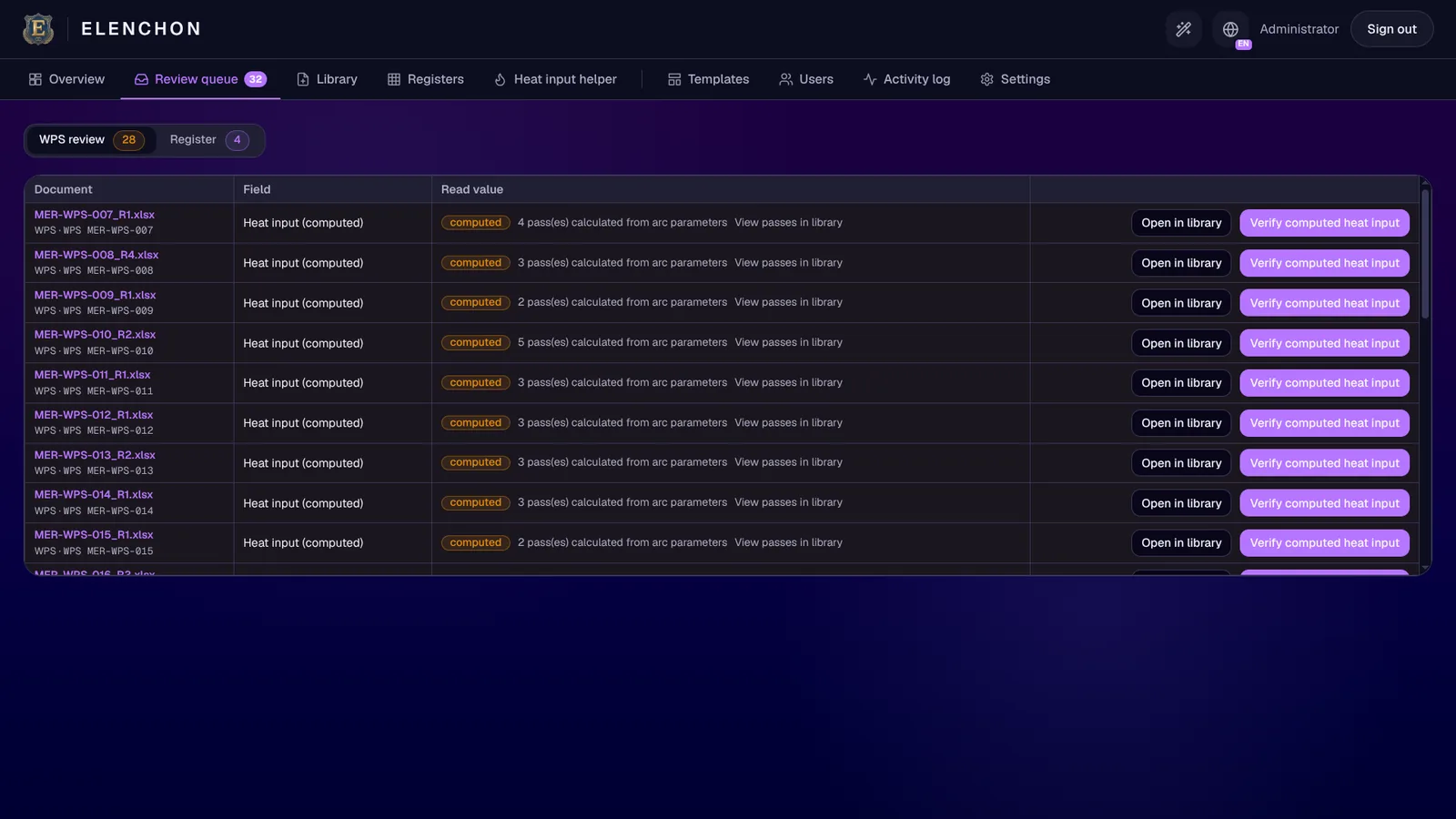
Notice what these rows are: heat inputs the app computed because the forms left them blank. It didn't slip a number in silently — it flagged all 28, showed you how many passes each came from, and is waiting for you to verify against the PQR.
Your Own Workbook — Visualised, Versioned, Export-Ready
The register you keep is your spreadsheet, held as a live grid and backed by a full version history. The master file head office asks for is one click away.
- Visualised, not just stored: Your master sheet opens as a fast, filterable grid — here, 36 rows across 28 columns — instead of a spreadsheet you scroll by hand.
- Every version kept: Each approved change-set makes a new version. Roll back to any snapshot; the newest is always protected.
- Export on demand: Produce a clean Excel workbook whenever you need it — or an export bundle (.zip) with the register plus the folder of linked WPS files, so the paperwork travels with the sheet.
- Re-compute / sync: Pull the latest values from the library into the register in one action, so the sheet never quietly drifts from the documents behind it.
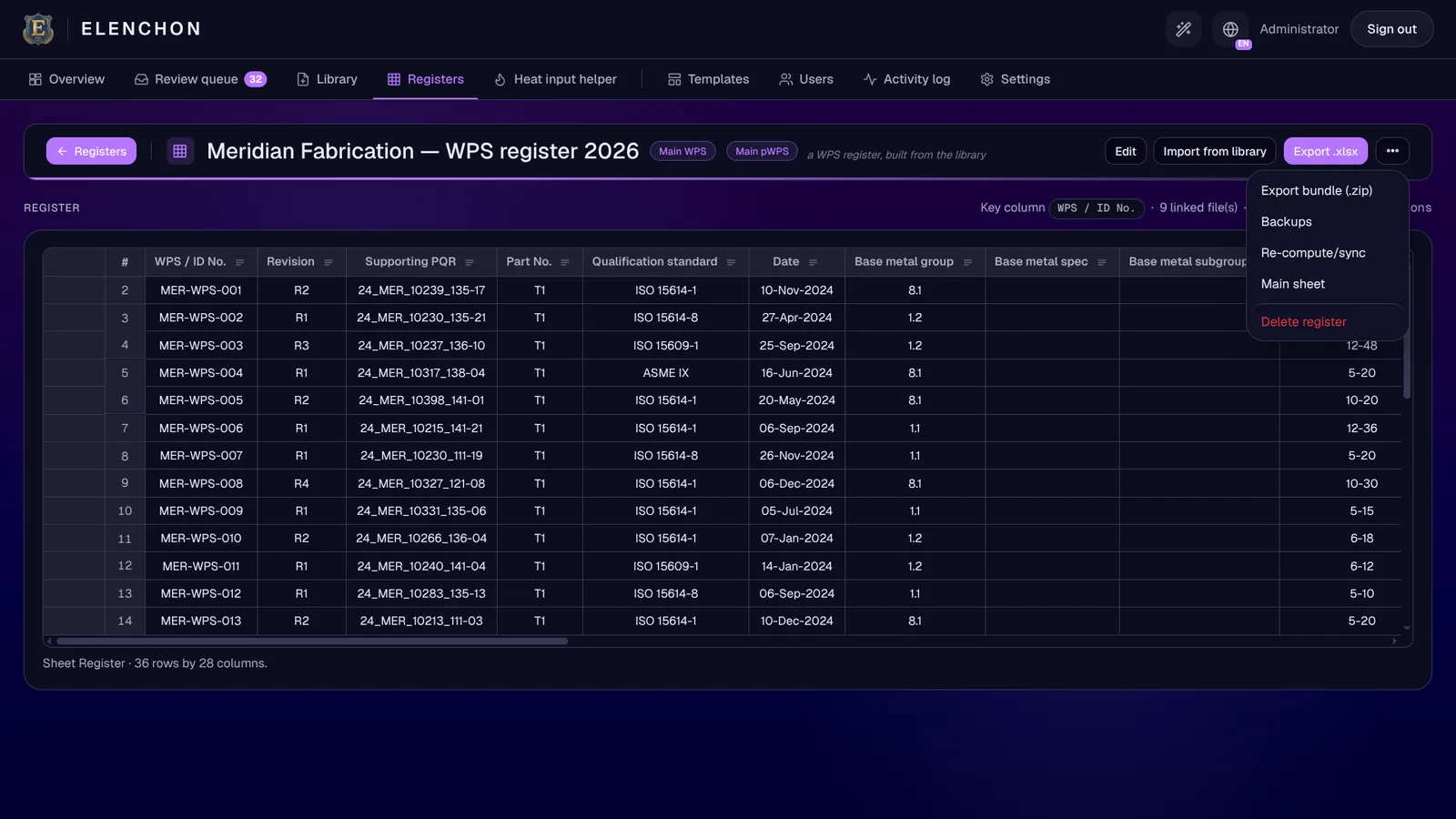
This is the whole point: the register isn't a report the app regenerates and hands back changed — it's your workbook, kept current. Export .xlsx gives head office the master sheet; Export bundle gives an auditor the sheet and all nine linked files, zipped.
Every Field, Down to the Pass Table
Behind every register row is a fully-read document. Not a filename — header fields, the full pass table, materials and consumables, all structured, all searchable.
- Three document types, one home: WPS, pWPS and WPQR each get a tab, each parsed and linkable, each showing a Parsed and Linked status at a glance.
- The real detail: Header block — standard, base metal, thickness and diameter range, preheat, shielding — plus the full pass table with process, filler class, polarity, current, voltage, travel speed and heat input for every pass.
- Edit and verify in place: Correct any value or its label and save; a one-click verify clears a low-confidence flag, and computed heat input clears across every pass at once.
- Filter by what's inside: Narrow by process, material, position, thickness — even by values inside the passes, like “every WPS that runs a 111 root.”
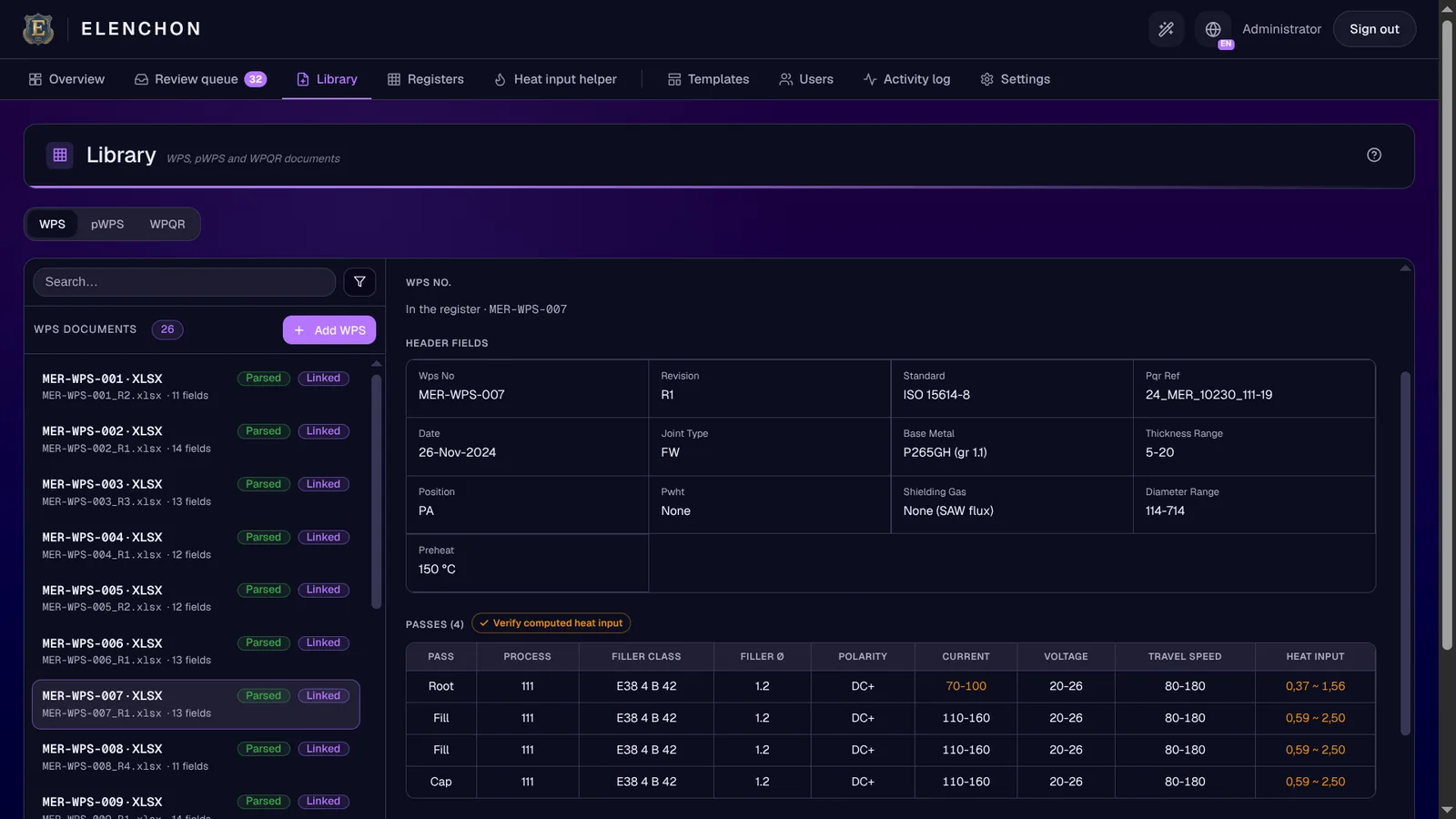
This is MER-WPS-007, read from an Excel workbook: ISO 15614-8, P265GH, four passes on process 111, each with its own current, voltage and travel-speed window. The amber heat-input figures are the computed ones — the same values sitting in the review queue, waiting to be verified.
A WPS Never Stands Alone
It's qualified by a WPQR, which traces back to a pWPS. The library keeps that chain linked, so from any record you can see exactly what supports it.
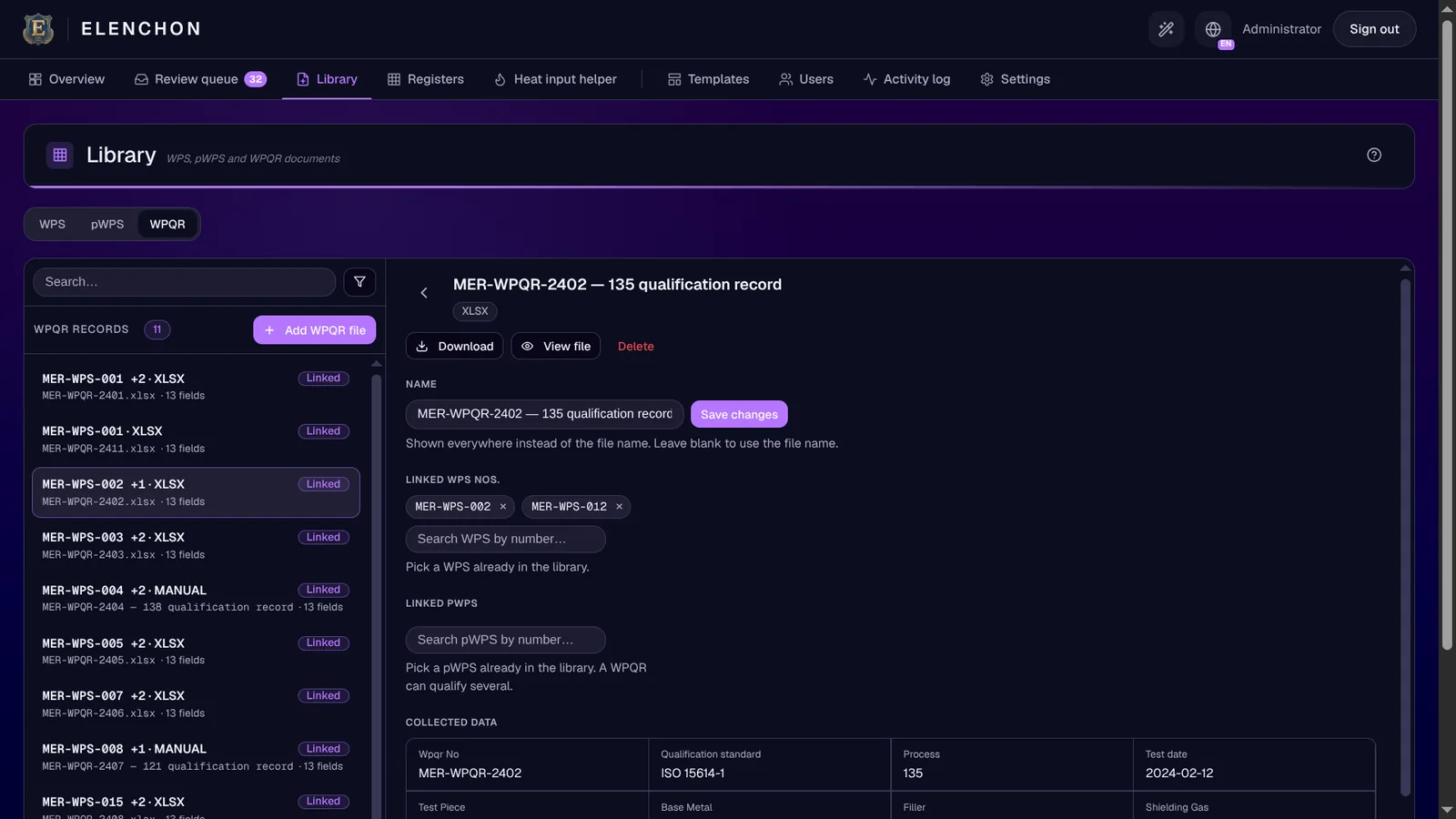
- WPQR linked to the WPS it qualifies: A single WPQR can support several procedures — here it's linked to two WPS numbers, picked from the library by number.
- pWPS linked to the WPQR: Trace each qualification record back to the preliminary WPS behind it — the full pWPS → WPQR → WPS chain, visible and one click apart.
- Collected data, structured: Qualification standard, process, test date and the rest are read into fields, not left buried in an attachment.
- Where WPS Manager stops: It attaches, links and displays these records — capturing WPQR results live on the floor is the job of the full Elenchon platform.
Stay Inside the Qualified Window — On Purpose
Heat input is where a perfectly good procedure quietly goes out of qualification. The helper makes the safe window impossible to leave.
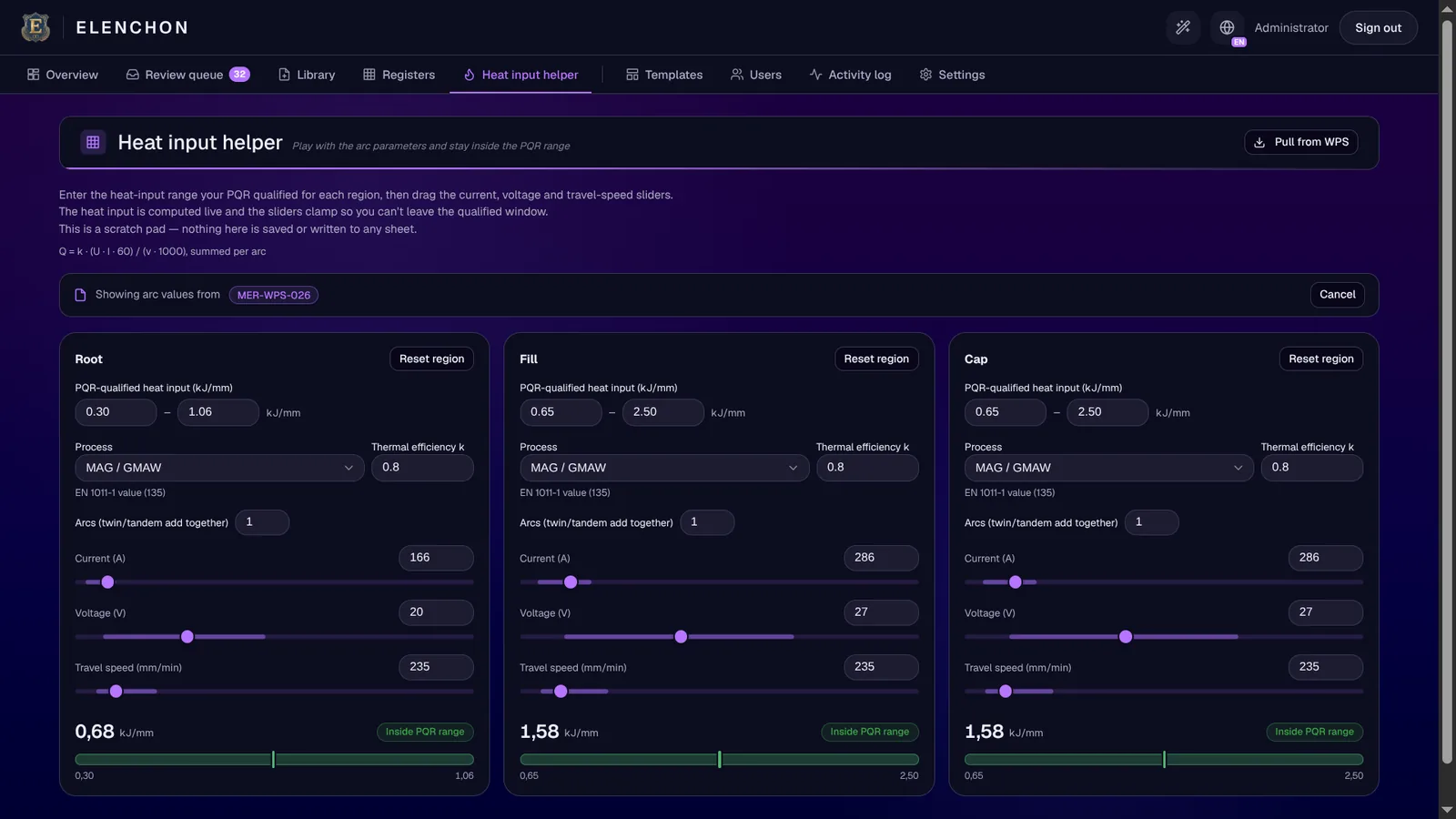
- Pull straight from a WPS: Load a parsed WPS and its per-region ranges and processes fill in automatically — here, the arc values from MER-WPS-026.
- Sliders that can't leave the window: Drag current, voltage and travel speed and watch the heat input compute live; the controls clamp to your PQR-qualified range, so a red result is impossible to dial in.
- Root, fill and cap independently: Each weld region gets its own qualified range and its own live read — green “Inside PQR range” when you're safe.
- Multi-arc aware: Tandem and twin-arc setups sum across heads, the way the standard expects. It's a scratch pad — nothing is saved or written to any sheet.
Who Changed What, and Who's Allowed To
Your procedures are proprietary and your register is audit evidence. Every tenancy is engineered with the same discipline as the on-premise Elenchon platform — a full trail, real roles, and rules you set.
- A full audit trail: Every recompute, import, edit and verification is recorded — what changed, who changed it, and when — and searchable, so an audit question is a lookup, not an investigation.
- Role-based access: Admins, editors and viewers, right down to a read-only seat for your TÜV or notified-body inspector. Editors change data; viewers can only look.
- Rules you set: Choose how imports land, and how long the activity log, register backups and old versions are kept — or keep them indefinitely.
- One tenant per instance: Your register and documents never share a database with another shop's — plus signed sessions, a strong password policy, lockout and per-IP rate limiting on by default.



Clean Export Today, Authoring Next
WPS Manager already emits a clean Excel workbook for any WPS you hold, and that file re-imports losslessly. Full in-cloud authoring builds on that foundation.
Lossless round trip, today
Generate a tidy single-WPS workbook — or the whole register as one spreadsheet — that opens in Excel and re-imports without losing a value.
Spreadsheet-simple authoring, next
Define headers, fill cells, and an automatic styling script turns them into a finished, formatted WPS — the fragile hand-built template, retired. On the roadmap.
Put Your Register on This
Onboarding is guided directly by the founders — send us a few of your WPS documents, we confirm the parser reads your template, and you go live with a register proven on your own paperwork. Everything handled confidentially.
No sales layers, no call queues — you talk to the people who built it.